raygui-jlt Guide
User-facing documentation for raygui-jlt: 24 raygui examples written in jolt (native Clojure on Chez Scheme, no JVM), calling raygui directly over its C ABI through jolt.ffi. No wrapper library, no codegen: one shared bindings namespace and a suite of small example programs on top of it.
The suite is complete: 24 examples across 7 groups. bb info always prints the live count.
Why this exists
raygui is raylib's companion immediate-mode GUI library, and it turns out to be a very good fit for a small, direct FFI binding: its 61 functions almost all share one shape, a Rectangle passed by value, application state through a pointer, an int result. There is no callback machinery, no retained widget tree, and raygui keeps no per-control state of its own, which is exactly what makes it easy to bind and hard to leak. the-ffi-shape.md is the full account.
Relationship to b12n-raylib-jlt
Same approach, different library. Both repos bind a real C library directly over its ABI with jolt.ffi, Chez foreign-procedure underneath, no wrapper and no codegen. Where they differ is how hard the library leans on structs passed by value, and that difference is much smaller here than it is there.
raylib's interesting surface is Image, Texture, Font, Model and the Camera2D / Camera3D pair, several of which need the pointer-trick workaround b12n-raylib-jlt documents. raygui's only by-value struct anywhere in its control surface is Rectangle, plus Color in one icon function and Font in the two font accessors this repo leaves unbound. One recurring 16-byte struct, one module-level scratch buffer, and the whole class of FFI lifetime bugs a bigger struct surface would invite never comes up.
The three commands that matter
bb lib:build        # compile the vendored header into lib/libraygui.{dylib,so}
bb check             # headless compile of all 24 examples, no window
bb <example-name>    # run one, e.g. bb basic-controls (opens a window)
Example tasks build the native library automatically if it is missing, so a fresh clone runs bb basic-controls with no separate setup step.
What's on these pages
building-libraygui.md: raygui ships no library. This repo builds its own from a vendored header, and the one detail that makes the build actually work is that it must link raylib dynamically. Read this first if you are wondering why there's a build step at all.the-ffi-shape.md: the recurring by-value-Rectangle-in, pointer-out,int-result signature; the scratch Rectangle and the second bufferGuiScrollPanelneeds; cells and their eight types; the twochar**functions; and what's verified versus assumed on non-AArch64 hardware.what-the-gates-do-not-catch.md: four ways an example can be wrong while passing every automated check, each one measured, not guessed. The most useful page here if you're about to add an example of your own.example-catalog.md: every example, its group, what it shows, and which raygui controls it exercises.
What this repo does not cover
Demo GIFs. Recording is a stated non-goal, not an oversight: the sibling repo measured that synthetic clicks do not actuate a raylib app at all (0 of 8 clicks delivered at every tested hold duration), and raygui is mouse-driven by definition, so a recorded GIF could never show a button being pressed, a dropdown opening, or a slider being dragged.
Vendored revision
vendor/raygui.h is pinned at 5.0-9-gfbf5d95, zlib licensed. See NOTICE for the full attribution, including the four examples ported from raygui's own example tree.
See also
- raygui: the upstream library.
- raylib: the library raygui draws through, and the one this repo links dynamically at build time.
- jolt: the native Clojure implementation whose
jolt.ffidoes all the binding work described on these pages. b12n-raylib-jlt's owndocs/guide/: the sibling this repo's pattern follows, and the deeper read on struct-by-value FFI tricks this project mostly doesn't need.
Building libraygui
The page with no equivalent in the sibling repo, and the one a reader most needs.
b12n-raylib-jlt loads a system-installed libraylib: brew install raylib and you're done. raygui has no such option. raygui is header-only: upstream ships a single raygui.h you #include with RAYGUI_IMPLEMENTATION defined once, and there is no libraygui.so, no Homebrew formula, and nothing on any distro's package index to install. jolt.ffi needs a shared library to load, so this repo builds its own.
What vendor/ holds
vendor/raygui.h: a pinned, unmodified copy of upstream's header at revision5.0-9-gfbf5d95.vendor/raygui_impl.c: the one compilation unit. Two lines:#define RAYGUI_IMPLEMENTATIONthen#include "raygui.h".
What bb lib:build does
It runs a compiler invocation defined in bb.edn. On macOS:
cc -O2 -dynamiclib -fPIC -DBUILD_LIBTYPE_SHARED \
   -I vendor \
   -I /opt/homebrew/include \
   -L /opt/homebrew/lib -lraylib \
   -framework CoreVideo -framework IOKit -framework Cocoa -framework OpenGL \
   -o lib/libraygui.dylib vendor/raygui_impl.c
The Homebrew include/lib paths are named explicitly because they aren't on the compiler's default search path. bb lib:check reports whether raylib is installed and whether libraygui is already built, with the fix for each; every example task runs bb lib:build automatically if the library is missing, so a fresh clone needs no separate setup step.
Why the raylib link must be dynamic
This is the load-bearing part of the whole build, and it fails silently if you get it wrong.
raygui's controls call raylib's own functions internally: GetMousePosition, DrawRectangle, MeasureTextEx, and more, every frame. Those calls must reach the same libraylib instance that the jolt process has already loaded, or raygui reads mouse position and draws geometry against a second, independent copy of raylib's global state, one that never receives input events and never gets flushed to the real framebuffer. The result: every control renders (raygui draws its own chrome) but nothing ever responds to input, because the click landed in the jolt process's libraylib instance while the control checked a different one.
A statically-linked raygui would compile and load without error, and every control would simply be inert. There is no crash, no warning, nothing in the log to point at. Dynamic linkage gives raygui and jolt the same libraylib instance for free, because both resolve the same shared library at load time; -lraylib in the build invocation above links dynamically by default, so getting this right on macOS is a matter of not accidentally adding a static-link flag, not adding one.
Verifying a build
Two checks, both read-only:
nm -gU lib/libraygui.dylib | grep -c ' T _Gui'
# 61

otool -L lib/libraygui.dylib
# lib/libraygui.dylib:
#         lib/libraygui.dylib (compatibility version 0.0.0, current version 0.0.0)
#         /opt/homebrew/opt/raylib/lib/libraylib.600.dylib (compatibility version 600.0.0, current version 6.0.0)
#         /System/Library/Frameworks/CoreVideo.framework/...
#         /System/Library/Frameworks/IOKit.framework/...
#         /System/Library/Frameworks/Cocoa.framework/...
#         /System/Library/Frameworks/OpenGL.framework/...
#         /usr/lib/libSystem.B.dylib
nm -gU reports 61 exported T _Gui* symbols, matching the 61 RAYGUIAPI declarations in vendor/raygui.h. otool -L is the dynamic-link check itself: the second line naming libraylib.600.dylib (not a static blob folded into the binary) is what makes the previous section true. If that line is missing, or points somewhere other than the raylib you expect, the build has silently gone wrong in exactly the way that produces inert controls.
Linux: untested
cc -O2 -shared -fPIC -DBUILD_LIBTYPE_SHARED \
   -I vendor \
   -lraylib -lGL -lm -lpthread -ldl -lrt -lX11 \
   -o lib/libraygui.so vendor/raygui_impl.c
These flags are written from the macOS invocation, using the distro-default include and library search paths instead of Homebrew's. They have not been run. Do not treat them as working until someone builds and screenshots at least one example on Linux.
Bumping the vendored header
- Replace
vendor/raygui.hwith the new revision. - Update the pinned revision string in
NOTICE. bb lib:buildto recompile against it.bb checkto confirm every example still compiles against any signature changes.- Re-run and re-screenshot at least
scroll-panel, the example most exposed to a layout or style regression (it is the one control taking two by-valueRectangles in a single call), and any example whose control depends on the currently-loaded style once the styling group lands.
See also
the-ffi-shape.md: what this dynamically-linked library lets jolt call, and how.what-the-gates-do-not-catch.md: the byte-swapped style-color trap, one layer up from the build itself.
The example catalog
A map of the whole suite. Each example is one namespace under src/net/b12n/raygui_jlt/, runnable with a friendly bb <name> task or the underlying jolt -M:<name> without babashka. scripts/examples_registry.clj is the single source of truth this page is generated from; bb info prints the same grouping live.
bb <name>       # e.g. bb basic-controls (opens a window)
bb examples     # flat list with descriptions, plus the count
bb info         # the grouped cheat-sheet this page mirrors
24 examples across 7 groups. The suite is complete. Run bb info for the count that is actually true right now, not this page's memory of it.
basics
| preview | bb name | what it demonstrates |
|---|---|---|
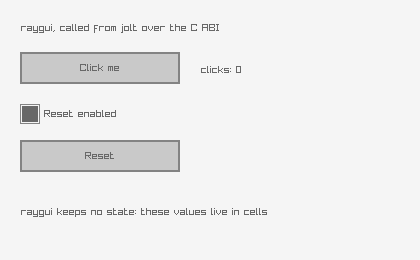 | basic-controls | The smallest complete raygui program: a button, a label and a checkbox over a live click counter. It proves the vendored library loaded, the by-value Rectangle reached the right bounds, and a :bool cell round-tripped through raygui's pointer API. |
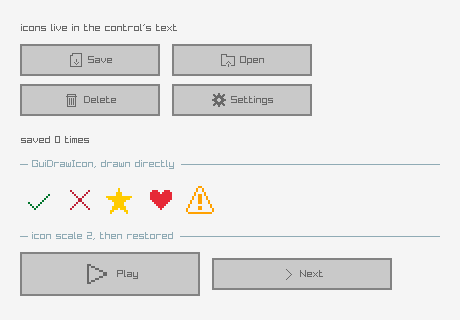 | icon-buttons | raygui ships 256 icons inside the header itself, so there is no image file to load. An icon reaches a control through its text: GuiIconText prepends a #nnn# marker that any control renders as the icon, while GuiDrawIcon draws one directly at a pixel size. The last row sets icon scale to 2, a reminder that the scale is global and persists until it is set back. |
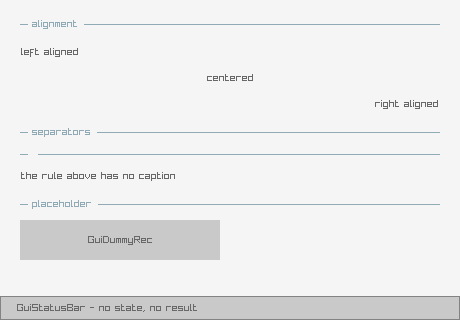 | labels-lines | The controls that carry no state: labels at three text alignments, separators with and without a caption, a placeholder box and a status bar. Also the one thing to watch about raygui styling: style properties are global and persist across frames, so a control that changes TEXT_ALIGNMENT for itself has to restore it, or every later control inherits it. |
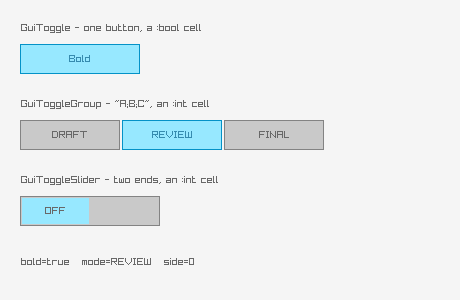 | toggles | The three toggle controls side by side. GuiToggle is a single on/off button over a :bool cell; GuiToggleGroup and GuiToggleSlider both take their options as one semicolon-separated string and report the selected index through an :int cell, raygui's usual way of passing a list without an array crossing the FFI boundary. |
inputs
| preview | bb name | what it demonstrates |
|---|---|---|
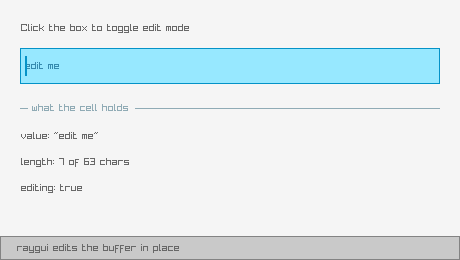 | text-box | An editable text box, and the edit-mode pattern every text-entry control in raygui uses. raygui keeps no memory of which box is being edited: the control returns non-zero when it wants the mode toggled, and the application flips its own :bool cell, so the same mechanism that carries control values also carries UI state. The buffer itself is a :text cell, a fixed char array raygui edits in place. |
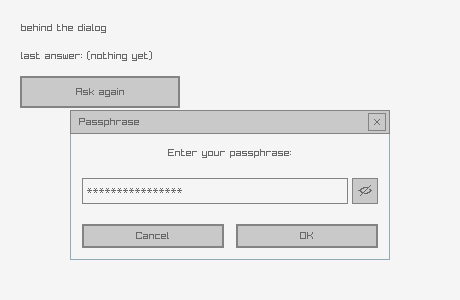 | text-input-box | GuiTextInputBox, a modal prompt built from a title, a message, an entry and a button row. The button row is one semicolon-separated string and the result arrives as an index in an :int cell, exactly like the toggle group. The optional secret cell adds a show/hide toggle and masks the entry, which is why it is a cell rather than a plain flag. |
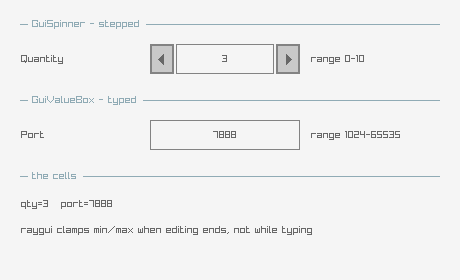 | spinner-value-box | The two integer entry controls. GuiSpinner has increment and decrement buttons; GuiValueBox is the same field without them, for typing a number directly. Both clamp to their own min and max once editing ends, but not while typing, so the cell can transiently hold an out-of-range value mid-edit. Both carry the edit-mode pattern from text-box. |
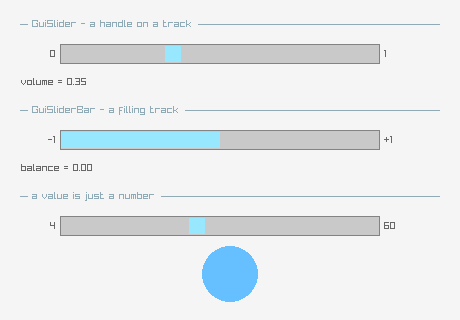 | sliders | GuiSlider and GuiSliderBar over :float cells. The two differ only in appearance: the slider draws a handle on a plain track, the slider bar fills the track up to the value. Both write straight into a :float cell, which is the whole of their state. The bottom row feeds a slider's value into a raylib circle, showing that a control's value is just a number once it is read back. |
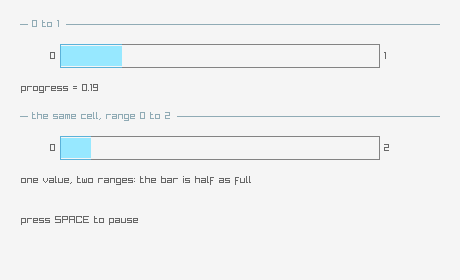 | progress-bar | GuiProgressBar, the one control the user cannot move. It still takes its value by pointer like every other control, because raygui's API is uniform, but nothing in the control writes back: the application advances the cell. Here a timer does it, wrapping at 100%, with a second bar showing the same value against a different range. |
collections
| preview | bb name | what it demonstrates |
|---|---|---|
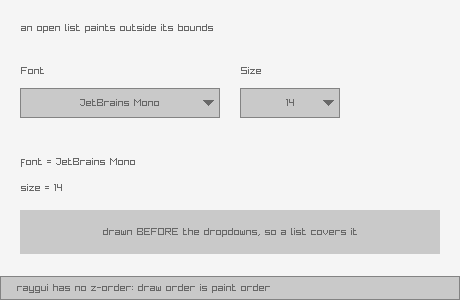 | dropdown-box | GuiDropdownBox, and the one layout rule immediate mode imposes. An open dropdown paints its list outside its own bounds, and raygui has no z-order, so draw order is paint order: a dropdown has to be drawn last, or whatever comes after it paints over the open list. This example draws its content first and the two dropdowns last, deliberately. |
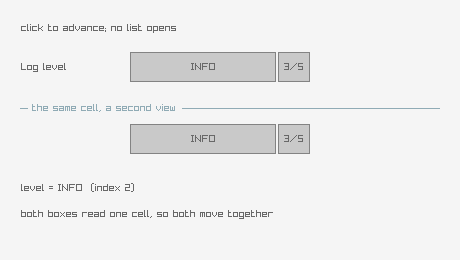 | combo-box | GuiComboBox, the dropdown's simpler sibling. It never opens a list: a click just advances to the next option in place, which makes it stateless in the UI sense, no edit mode to own, no draw-order rule to respect, at the cost of being slow to reach a distant option. The two controls here deliberately share ONE cell, so clicking either moves both: the cell is the state, and each control is only a view of it. |
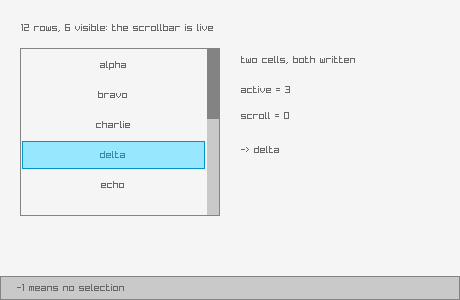 | list-view | GuiListView over a semicolon-separated string. Two cells, because raygui writes to both: one holds the scroll position (the index of the first visible row) and one the selection, where -1 means nothing is selected. Neither is remembered by the control between frames. The list holds more rows than fit, so the scrollbar is live. |
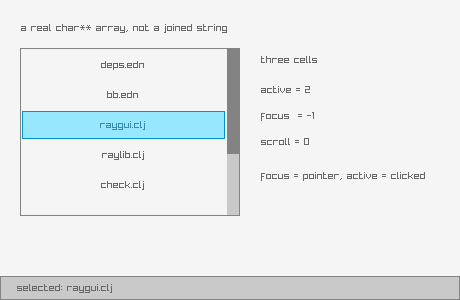 | list-view-ex | GuiListViewEx, the list view that takes a real string array and reports focus. This is one of only two raygui functions taking a real char** array rather than a semicolon string, so it is where an array actually crosses the FFI boundary: jolt's with-c-string-array builds it and frees every member plus the array itself on the way out, so the control is called inside that body rather than the array being handed back. The extra cell is :focus, the row the pointer is over, which is not the same as the row that is selected. |
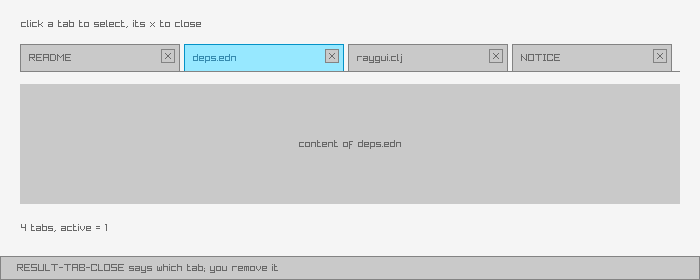 | tab-bar | GuiTabBar, and the one result value that is not a yes or no. Every other control answers "nothing happened" or "something changed"; the tab bar has a third answer, RESULT-TAB-CLOSE, meaning the user clicked a tab's close box. raygui does not own the tab list, so it cannot remove anything: it reports which tab and the application decides. Here closing a tab really removes it, so the list shrinks. |
containers
| preview | bb name | what it demonstrates |
|---|---|---|
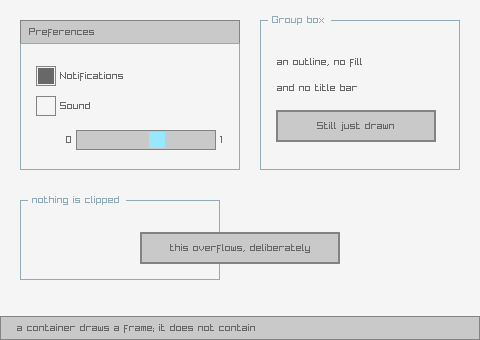 | panel-group-box | GuiPanel and GuiGroupBox, and what a container is not. Neither one contains anything: they draw a frame, they do not clip, do not own children, and do not offset what is drawn inside them. A control appears "inside" a panel only because its coordinates fall within the panel's rectangle and it was drawn afterwards, which is all containment means in immediate mode. The proof is the last group box, where a button is drawn deliberately overflowing it and nothing stops it. |
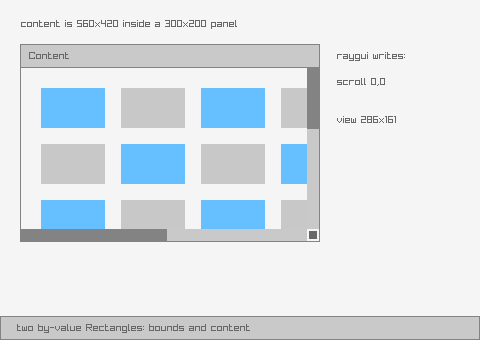 | scroll-panel | GuiScrollPanel, the only container that really clips, and the only control taking two by-value Rectangles in one call: its own bounds and the size of the content behind it. raygui writes back the scroll offset and the visible region so the caller knows how to draw the content shifted; drawing the content into a scissor region offset by that scroll is the caller's job, since raygui clips its own chrome, not the caller's drawing. Port of raygui's own scroll_panel example. |
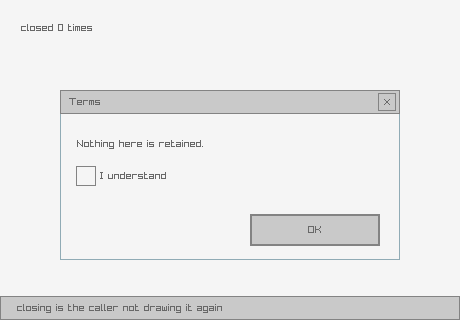 | window-box | GuiWindowBox, a panel with a title bar and a close button. Closing it does nothing on raygui's side: there is no window object to destroy and no visibility flag to clear, the control just reports that the close button was clicked and the application stops calling it. Reopening is just calling it again. |
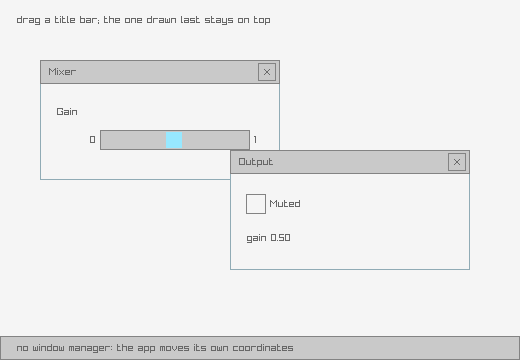 | floating-window | Draggable windows, hand-rolled because raygui has no window manager. The application watches for a press inside a title bar, remembers the grab offset and moves its own coordinates; the window box itself never knows it moved. Two windows also make the draw-order rule concrete, since there is no z-order either: the one drawn last is the one on top, and clicking a window that is behind does not raise it. Port of raygui's own floating_window example. |
dialogs
| preview | bb name | what it demonstrates |
|---|---|---|
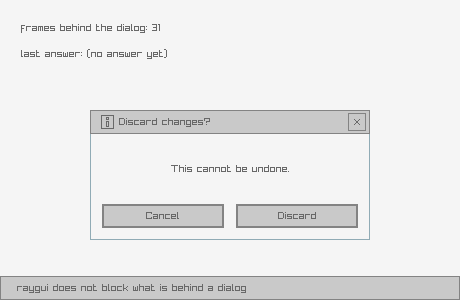 | message-box | GuiMessageBox, and what modality does not mean. raygui draws a dialog; it does not block anything behind it. There is no modal loop and no input capture: if the caller keeps drawing the controls underneath, they keep responding. Modality is the caller declining to draw the rest, and the counter behind the dialog keeps running to make that visible. |
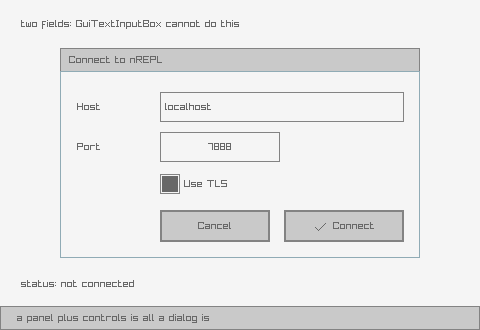 | custom-input-box | A dialog raygui does not ship, built from the controls it does. GuiTextInputBox is one fixed arrangement: title, message, entry, buttons. When that is not the arrangement wanted, there is nothing to subclass and nothing to configure, only a panel with controls placed on it, which is all GuiTextInputBox is doing internally. This one takes two fields rather than one, which the built-in cannot do at all. Port of raygui's own custom_input_box example. |
color
| preview | bb name | what it demonstrates |
|---|---|---|
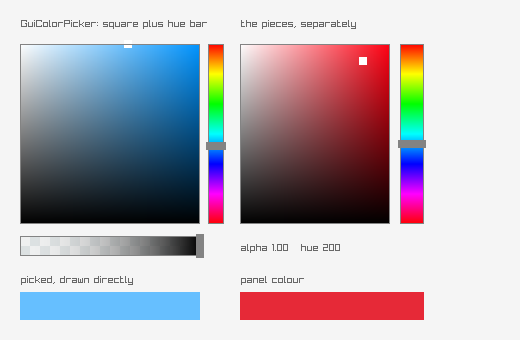 | color-picker | GuiColorPicker, plus the separate panel and bars it is assembled from. Worth knowing which encoding is in play: a :color cell holds a raylib Color, already packed 0xAABBGGRR, so a picked colour goes straight into a drawing call with no conversion, while a colour read from GuiGetStyle is raygui's 0xRRGGBBAA and must go through style-color first. Only the style side needs converting. Its return value is also not a reliable change signal: GuiColorPicker's hue bar unconditionally overwrites the square's result rather than OR-ing with it, so this example reads the cell instead of the return. |
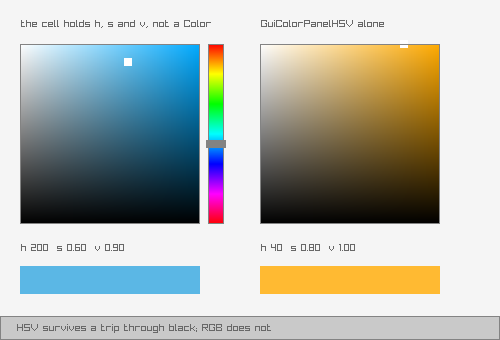 | color-picker-hsv | The HSV picker, and why raygui ships a second one. It looks like GuiColorPicker; it differs in what it stores. The RGB picker keeps a Color, so hue and saturation are re-derived from RGB every frame, and at zero saturation or zero value there is no hue left to derive: drag a colour down to black and its hue is gone when dragged back up. The HSV picker keeps h, s and v in a :vector3 cell instead, so hue survives, and the readout below shows the cell directly, where the difference is visible. |
styling
| preview | bb name | what it demonstrates |
|---|---|---|
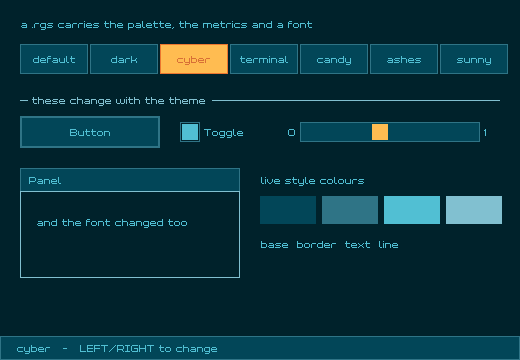 | style-selector | Cycling the six vendored .rgs themes. A .rgs file carries the whole appearance: colours, metrics and an embedded font, and loading one replaces raygui's global style, so every control drawn afterwards changes at once, including this example's own controls. The style is loaded from memory rather than by path, since GuiLoadStyle resolves its argument against the process working directory. Every colour on screen comes from style-color, which routes through raylib's GetColor, the same 0xRRGGBBAA-versus-0xAABBGGRR swap what-the-gates-do-not-catch.md measures elsewhere. Port of raygui's own style_selector example. |
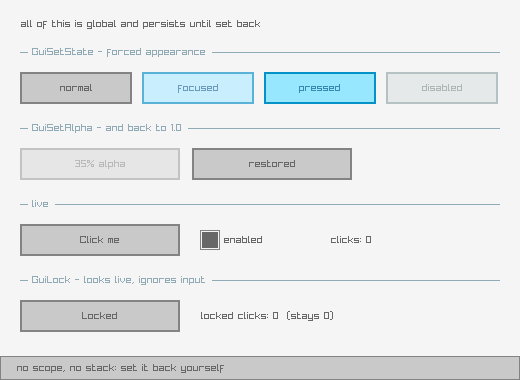 | gui-state | The global state API, and the discipline it needs. GuiSetState, GuiSetAlpha and GuiLock are all global and persistent: they apply to every control drawn afterwards until something sets them back, with no scope and no stack. Forgetting to restore one is the characteristic raygui bug, since the affected controls still draw, just wrong. Every block in this example sets its value back immediately. The bottom row is genuinely locked via GuiLock: click it and nothing happens. |
What the previews are
Every preview is a real capture of the example actually running, not a mockup. Each was produced by running the example with RAYGUI_APP_AUTO_QUIT_MS set, so the window closes itself, and RAYGUI_APP_SHOT pointed at a path, so it screenshots frame 30 before it does: the same mechanism what-the-gates-do-not-catch.md describes as this project's actual gate.
They are static frames, not recordings, and that is a deliberate choice, not a shortcut. raygui is mouse-driven by definition, and synthetic input does not actuate a raylib/GLFW window at all: measured upstream, 0 of 8 synthetic clicks and 0 of 2 synthetic drags were delivered at any hold duration tried, against 3 of 3 for plain pointer motion, because a window like this ignores pid-routed button events. An animated recording could show a cursor drifting toward a button; it could never show that button actually being pressed, a dropdown opening, or a slider being dragged. A still frame does not claim more than it shows, which is the honest version of a preview here.
Ports of raygui's own examples
Four examples are direct ports of programs in raygui's own examples/ tree: scroll-panel, floating-window, custom-input-box and style-selector, all built and in the tables above. NOTICE carries the attribution for all four.
Adding an example
Five touchpoints, from AGENTS.md:
- Source:
src/net/b12n/raygui_jlt/<name_underscored>.clj deps.ednalias::<name> {:main-opts ["-m" "net.b12n.raygui-jlt.<name>"]}check.cljrequire: alphabetically, so the compile gate covers it- Registry row:
["<name>" "<alias>" "<group>" "<desc>"]inscripts/examples_registry.clj, the single source of truth this page is generated from bb.edntask:<name> {:doc "▶ <desc>" :task (run-example "<name>")}
bb examples enforces the 49-character description cap and cross-checks the registry's description against bb.edn's :doc string, exiting non-zero on either mismatch, so a drifted description here is a build failure, not a stale doc page.
See also
the-ffi-shape.md: the binding pattern every control in this catalog shares.what-the-gates-do-not-catch.md: why a new example needs a screenshot that was actually looked at, and in some cases a read of the vendored C source, before it is done.
The FFI shape
Why raygui suits jolt, for a reader who knows neither.
One recurring signature
raygui's API is 61 functions, and nearly every control shares the same three-part shape: a bounding Rectangle by value, application state through a pointer, and an int result telling the caller what happened.
int GuiSlider(Rectangle bounds, const char *textLeft, const char *textRight,
              float *value, float minValue, float maxValue);
The raw binding mirrors it directly:
(ffi/defcfn gui-slider "GuiSlider"
  [[:by-value [:struct [[:x :float] [:y :float] [:width :float] [:height :float]]]]
   :string :string :pointer :float :float] :int)
and the kwarg wrapper on top hides the bounds construction and turns the raw result into the shape a caller actually wants:
(defn slider!
  [& {:keys [x y w h left right cell min max]
      :or {x 0 y 0 w 200 h 20 left "" right "" min 0.0 max 1.0}}]
  (pos? (gui-slider (bounds! x y w h) left right (ptr cell)
                    (double min) (double max))))
bounds! is the scratch Rectangle below; cell is the pointer out-param below; pos? turns raygui's RESULT_CHANGED (2) into a plain boolean, true on change. That's the whole pattern, repeated with minor variation across most of the 61 functions. There is no callback machinery to bind, no retained widget tree to model, and raygui keeps no per-control state of its own to worry about ownership of.
The single scratch Rectangle
Every control takes Rectangle bounds by value, and jolt's [:by-value ...] wants a pointer to caller-owned native storage, copying the struct's bytes at call time rather than retaining the pointer. That last fact is what makes one shared buffer safe: since the callee never holds on to the pointer past the call, the caller can reuse the same 16 bytes for every control in the frame.
Verified, not assumed: four controls drawn at four different positions through one shared buffer render pixel-identical to four separate allocations. So the raygui namespace owns exactly one module-level scratch Rectangle, rewritten immediately before each control call:
(def ^:private scratch-rect (ffi/alloc (ffi/layout-size rect-layout)))

(defn bounds! [x y w h] (write-rect! scratch-rect x y w h))
The consequence is the point, not a micro-optimisation: no example allocates or frees a Rectangle inside a frame, which removes an entire class of FFI lifetime bugs from all 24 example programs. The only lifetimes an example manages are its cells, below.
The second buffer, for GuiScrollPanel
One function breaks the one-buffer rule: GuiScrollPanel is the only raygui function that takes two by-value Rectangles in a single call, its own bounds and the size of the content behind it.
int GuiScrollPanel(Rectangle bounds, const char *text, Rectangle content,
                    Vector2 *scroll, Rectangle *view);
Clojure evaluates arguments left to right. Writing both rectangles through the same bounds! call would let the second write clobber the first before the FFI call ever happens, handing raygui the same rectangle for both parameters.
Measured, in the actual scroll-panel example: with content! not yet in place, a panel declared at 300×200 rendered at its 560×420 content size, covering the window, with both scrollbars live and no error anywhere, on screen or in a log. It looked like a working, if oddly large, scroll panel. Only the on-screen dimensions gave it away.
The fix is a second, dedicated scratch buffer:
(def ^:private scratch-content (ffi/alloc (ffi/layout-size rect-layout)))
(defn content! [x y w h] (write-rect! scratch-content x y w h))

(defn scroll-panel! [& {:keys [x y w h text content-w content-h scroll view] ...}]
  (gui-scroll-panel (bounds! x y w h) text
                    (content! 0 0 content-w content-h)
                    (ptr scroll) (ptr view)))
There is no third case: no other raygui function in the control surface takes more than one by-value struct, so two buffers is the whole fix, not a pattern to extend.
Cells: the pointer out-params
raygui keeps no state of its own. The application owns every value a control reads or writes, and C wants a pointer to it. A cell is a typed native slot, allocated once outside the frame loop and freed once after it:
(let [vol (rg/cell :float 0.35)]
  (rg/slider! :x 90 :y 130 :w 200 :h 20 :cell vol :min 0.0 :max 1.0)
  (rg/value vol))                       ; => 0.35, read with the right type
Eight cell types are supported: :float, :int, :bool, :color, :vector2, :vector3, :rect (all allocated through cell), and :text (allocated through the separate text-cell, because a text buffer's size isn't implied by its type the way the others' are). value reads a cell back typed; reset-cell! writes one; free-cell! releases it and is idempotent, since freeing an already-freed cell aborts the process outright rather than raising a catchable exception.
The raw gui-* bindings stay public underneath the kwarg layer, so an example can drop to the plain C shape where the wrapper gets in the way.
The two char** functions
Most list-shaped controls take their options as one semicolon-separated string and answer with an index in an :int cell, which keeps arrays off the FFI boundary entirely. Two functions break that pattern and take a real const char ** array: GuiListViewEx and GuiTabBarEx. Both are bound raw; only list-view-ex! wraps its Ex variant, built and freed inside one ffi/with-c-string-array so the array's member pointers never outlive the call that uses them:
(let [items (vec items) n (count items)]
  (ffi/with-c-string-array [arr n] items
    (pos? (gui-list-view-ex (bounds! x y w h) arr n
                            (ptr scroll) (ptr cell) (ptr focus)))))
tab-bar! deliberately calls the plain GuiTabBar (the semicolon-string variant) rather than the bound GuiTabBarEx, keeping the char** path to the one example that needs it.
What's verified on AArch64, and what isn't
Rectangle is 16 bytes of homogeneous float, small enough that AArch64 passes it in registers rather than indirectly through a pointer, a different path from b12n-raylib-jlt's pointer trick for its 24-byte Camera2D (too large for the register path, faked with a hand-built pointer instead). jolt 0.7.23's [:by-value [:struct ...]] handles the register-passed case without the caller knowing the difference.
This has been driven from jolt against a real window and verified by screenshot on AArch64 only. SysV x86-64 classifies a 16-byte homogeneous-float aggregate into a different register class, and nothing in this repo has run there. State what was tested; do not assume it ports.
Why 59 of the 61 are bound
Two functions, GuiSetFont and GuiGetFont, pass raylib's Font struct by value and are left unbound, not bound-and-unused. The vendored .rgs styles each carry and apply their own embedded font on load, so no example needs a font accessor, and binding one would add a Font marshalling layer nothing calls.
See also
building-libraygui.md: the library these bindings load.what-the-gates-do-not-catch.md: four ways code built on this shape can be wrong and still pass every automated check.
What the gates do not catch
The most useful page in this guide. Four failure classes, each found by running something and being surprised, each of which passes at least one automated gate while rendering or behaving wrong. For a GUI toolkit, that combination is the normal case, not the exception, which is why the screenshot is treated as a required gate here rather than a nicety.
1. A mid-frame screenshot without the batch flush writes a blank frame
raylib defers batched geometry, DrawText, shapes, everything, until EndDrawing. Calling TakeScreenshot before that flush captures the framebuffer as it stood before the current frame's drawing landed: a perfectly blank, valid PNG from a program that just drew four controls.
maybe-screenshot! flushes first, which is why every example's screenshot works:
(ffi/defcfn ^:private flush-batch "rlDrawRenderBatchActive" [] :void)

(defn maybe-screenshot! [frame at]
  (when (and shot-path (= frame at))
    (flush-batch)
    (take-screenshot shot-path)
    ...))
bb check does not catch this. It compiles every example headlessly and never draws a frame at all. The gate that catches it is looking at the PNG: a blank image means the flush is missing (or never ran), not that the example drew nothing by design.
2. Style colours are byte-swapped relative to raylib Color
raygui stores style colours as 0xRRGGBBAA. raylib's Color packs little-endian as 0xAABBGGRR. Feed one straight into a function expecting the other and you get a plausible, wrong colour, not an error.
Measured on the cyber style's background:
GuiGetStyle(DEFAULT, LINE_COLOR)  ->  0x81C0D0FF   (R=129 G=192 B=208 A=255, light blue)
fed directly to ClearBackground         ->  renders salmon pink
via GetColor()                          ->  renders light blue, correct
Nothing here throws. The window opens, the background paints some colour, and only comparing the render against the style's own declared value shows it's the wrong one, red and blue swapped into something that still looks like a deliberate choice. style-color wraps GetColor so this conversion happens once, correctly, and every example that themes itself from the loaded style goes through it rather than reading GuiGetStyle raw.
bb check does not catch this (no color comparison happens headlessly), and neither does a glance at the screenshot alone, since the wrong colour is still a colour. The gate is checking the rendered colour against the style's own declared value, not just confirming that something painted.
3. ffi/defcfn binds lazily
A jolt.ffi/defcfn form loads with no error even when the C symbol name it names doesn't exist. The failure only appears the first time the function is called:
Exception in foreign-procedure: no entry for "GuiGetStyleTYPO"
bb check compiles and requires every example namespace, which resolves macros and vars but never calls a single gui-* binding. A misspelled C symbol therefore compiles clean, passes bb check, and throws only at run time, inside whatever example first calls it, on whichever machine happens to run it next.
bb check does not catch this by construction: it is a require, not a call. The gate is either actually running the example (so the call happens and the missing symbol throws), or a static cross-check of every ffi/defcfn symbol name against nm -gU on the built library, confirming each named C symbol exists before anything tries to call it.
4. Outcome logic is invisible to screenshots
The sharpest of the four, because the first three are all visible-if-you-know-to-look: a blank frame, a wrong colour, a thrown exception. This one produces a screenshot that looks completely correct while the code behind it does the opposite of what it claims.
A screenshot shows a dialog open. It never shows what its buttons do.
The real example: GuiTextInputBox reports which button was pressed by writing an int result that is 0 for the window's own close X, and one-based for every button in the caller's semicolon list otherwise:
// raygui.h: btnActive = 0 for the window X, i+1 for the i-th button
With :buttons "Cancel;OK" that makes Cancel 1 and OK 2. text-input-box.clj first checked (= 1 result) to detect "OK pressed". Nothing about that crashes or even looks wrong on screen: the dialog opens, a button click closes it, some text appears. It just reports the wrong button every time, Cancel silently reporting success and OK silently reporting cancellation, with the on-screen result looking exactly as intended either way. Fixed by checking (= 2 result) for OK instead, per the header's actual encoding.
A second instance in the same suite: tab-bar.clj told a reader to click a tab's close x. GuiTabBarEx gates the entire close-button block on GuiGetStyle(TABBAR, TAB_CLOSE_BUTTON) (raygui.h:3938), and GuiLoadStyleDefault never sets that flag, leaving it 0. The close button the instructions pointed at was never drawn. The tab bar itself rendered fine, tabs selected correctly, and nothing about the screenshot showed a missing button, because there was nothing there to be missing from the image. Fixed with one line before the frame loop:
;; The close 'x' is off by default: GuiTabBarEx gates it on this style flag and
;; GuiLoadStyleDefault never sets it, so without this line the instruction
;; below points at a button that is never drawn.
(rg/gui-set-style rg/TABBAR rg/TAB-CLOSE-BUTTON 1)
No automated gate catches this class, and neither does looking at the PNG. The only thing that catches an outcome-logic bug is reading the vendored C source for any control whose result encodes more than a plain "pressed / not pressed": what each return value actually means, and which style flags gate which visible pieces.
Summary: which tool catches which class
| failure | bb check | screenshot | what actually catches it |
|---|---|---|---|
| missing batch flush (blank frame) | no | yes | look at the PNG |
| byte-swapped style colour | no | not alone | compare the rendered colour to the style's declared value |
misspelled C symbol (lazy defcfn) | no | no | run the example, or cross-check symbol names against nm -gU |
| wrong outcome/result encoding | no | no | read the vendored C source |
The first two are why the screenshot step exists at all for this suite. The last two are why it isn't sufficient by itself, and why every example task in this project's plan also asks whether the control's result meaning was checked against the header, not just whether the control renders.
See also
building-libraygui.md: the batch-flush and byte-swap traps both sit downstream of a correctly built, dynamically-linked library.the-ffi-shape.md: the binding shapes these failures hide inside.